 Celestial Catalog×
- +

Celestial Catalog
Celestial Catalog is a desktop-based Library Management System developed using Visual Basic.NET and MySQL. It allows administrators to manage books, authors, genres, and library members from a clean, organized desktop interface.
The system supports the full library workflow — from adding and editing catalog entries to issuing and returning books — with a dedicated circulation module and dashboard for quick access to all core functions.
The Problem
What problem?
Libraries managing books, members, and borrowing records manually — or across disconnected tools — face difficulty keeping catalog data accurate and circulation activity organized.
Why build it?
The goal was to build a complete, self-contained desktop system that covers the full library workflow: catalog management, member tracking, and book circulation — all from one interface.
The Solution
What was built?
Celestial Catalog is a desktop LMS with separate modules for managing books, authors, genres, members, and circulation. Admins can issue and return books, track borrowing records, and maintain the full library catalog from a single application.
How it works
Built with Visual Basic.NET for the desktop UI and MySQL via XAMPP as the database backend. Each module — books, authors, genres, members, circulation — is a dedicated form. The system tracks circulation state (issued vs. returned) and maintains member and catalog records persistently.
My Role
Group Project
- →Designed and built the full desktop application using Visual Basic.NET and MySQL
- →Implemented the book management module including add, edit, delete, and book list views
- →Built the circulation module for issuing and returning books, with full records tracking
- →Developed the manage genre, author, and member forms with CRUD operations
Process & Thinking
How I approached it
Mapped out the full library workflow first — catalog management, member management, and circulation — then built each as a separate module. Started with the dashboard as the navigation hub, then implemented each form portal one at a time.
Why this approach?
Visual Basic.NET was chosen because it produces a native Windows desktop application with a familiar form-based development model. The modular form approach made it easier to develop and test each section independently.
Key Insight
💡 Breaking the system into clearly scoped form portals (book management, circulation) kept the codebase manageable. Each form has a single responsibility, which made debugging and extending individual modules much simpler.
Tech Stack
Key Decisions
·Chose Visual Basic.NET for its built-in Windows Forms designer, which made it straightforward to build a structured desktop UI with form-based navigation.
·Organized the system into dedicated form portals per module (books, authors, genres, members, circulation) to keep each workflow isolated and easy to navigate.
·Used a portal pattern for complex modules — the Manage Book and Circulation buttons open dedicated sub-forms rather than cramming everything into one screen.
·Author selection during book addition is handled via an Author List Form that surfaces contextually — only shown when the user is filling in book details and needs to assign an author.
Architecture
No diagram provided
Features
Dashboard Overview
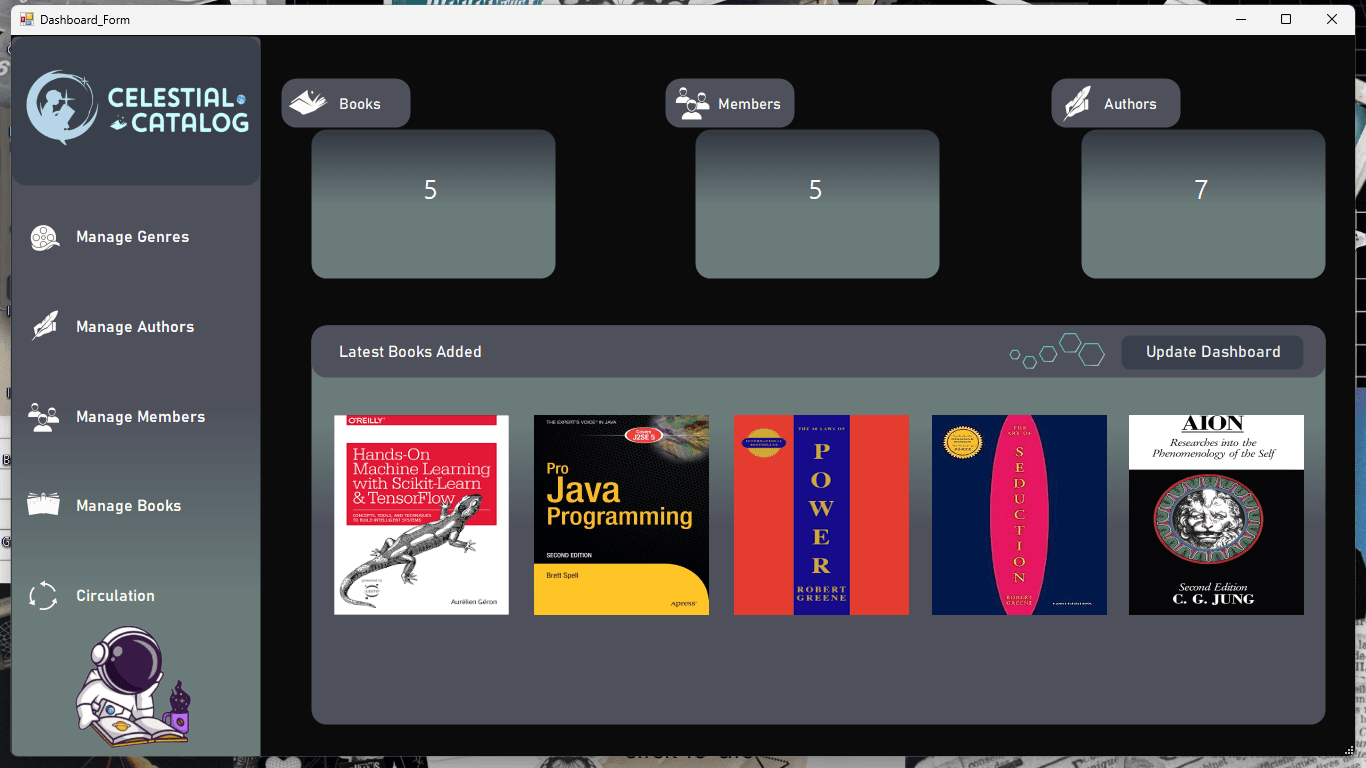
The main dashboard provides an at-a-glance overview of the library system with quick access to all modules — books, members, genres, authors, and circulation.
Book Management
Full CRUD support for library books — add new titles with author and genre assignment, edit existing entries, view the full book list, and remove books from the catalog.
Circulation Module
Issue books to members and process returns through a dedicated circulation portal. All borrowing activity is logged and viewable through the Circulation Records screen.
Member Management
Administrators can add new library members, edit existing member details, and remove members from the system.
Genre & Author Management
Dedicated forms for managing book genres and author records — add, edit, and delete entries that feed into the book catalog.
Challenges & Learnings
Challenge
Designing a multi-module system where each form portal stays independent but shares consistent data — like authors linking to books, or members linking to circulation records.
Learning
Established clear data relationships early and used shared state/data structures that each module reads from and writes to. This kept the modules decoupled while staying in sync.
Challenge
The Author List Form needed to appear contextually, only when the user was adding a book and required author information — without cluttering the main book form.
Learning
Implemented it as a modal-style form triggered specifically during the book add flow, keeping the main form clean while making author selection feel integrated.
Challenge
Managing Visual Basic.NET's Windows Forms layout across multiple complex screens with panels, tables, and action buttons — getting consistent alignment and spacing across all forms took significant iteration.
Learning
Settled on a consistent panel-based layout pattern applied across all forms, which made new screens faster to build and easier to keep visually consistent.
Results & Outcome
Deployment
Completed — Local
Users
Academic Project