 Heart Elect×
- +

Heart Elect
Heart Elect is a desktop-based Political Track Record System developed using Python, CustomTkinter, and MySQL. It allows administrators to securely store and manage verified political records sourced from trusted references.
Users can view politician profiles and track records through a clean, interactive feed, and engage with entries via features such as liking or unliking. Designed with usability and transparency in mind, this platform offers an organized and reliable way to access political information.
The Problem
What problem?
Citizens often lack a centralized, reliable platform to review and verify the track records of political figures. Without organized access to political data, making informed voting decisions becomes difficult.
Why build it?
Political transparency is essential in a democratic society. We built this system to give the public a straightforward tool for researching politicians — one that keeps data verified, organized, and easy to engage with.
The Solution
What was built?
Heart Elect is a desktop application that lets administrators manage verified politician profiles and track records, while users can browse a live feed, filter by position, and like or unlike entries.
How it works
Built with Python and CustomTkinter for the desktop UI, backed by a MySQL database for structured data storage. Admins manage all records through a secure dashboard, while users interact with the public-facing feed.
My Role
Team Project — Academic
- →Developed the frontend UI using Python and CustomTkinter
- →Designed and built the user feed and politician profile views
- →Implemented the like/unlike (heart) interaction system
- →Integrated MySQL database for storing politician records and user data
Process & Thinking
How I approached it
Scoped the system around three core user flows: admin record management, public politician feed, and user engagement via likes. Designed the database schema first, then built the UI around those data structures.
Why this approach?
Chose CustomTkinter over other GUI frameworks because it offered modern-looking widgets with minimal setup — important given the academic timeline. MySQL was a natural fit for structured relational data between politicians, users, and hearts.
Key Insight
💡 Keeping admin and user roles clearly separated early on prevented scope creep and made it easier to define what each side of the app needed to do.
Tech Stack
Key Decisions
·Chose Python with CustomTkinter for its straightforward desktop UI development and ease of integration with MySQL.
·Used MySQL for secure, structured storage of politician records, user accounts, and heart/like data across three core tables.
·Separated admin and user roles to ensure only verified records get published to the public feed.
·Kept the database schema minimal — three tables (politicians, users, user_hearts) — to match the scope of the academic project.
Architecture
No diagram provided
Features
Politician Feed
Users can scroll through a live feed of published politician profiles, viewing track records sourced and verified by administrators.
Like / Unlike System
Users can heart and save politicians to a personal gallery, and remove them from their likes at any time.
Filter by Position
Users can filter the politician feed by political position for faster, more targeted navigation.
Admin Dashboard
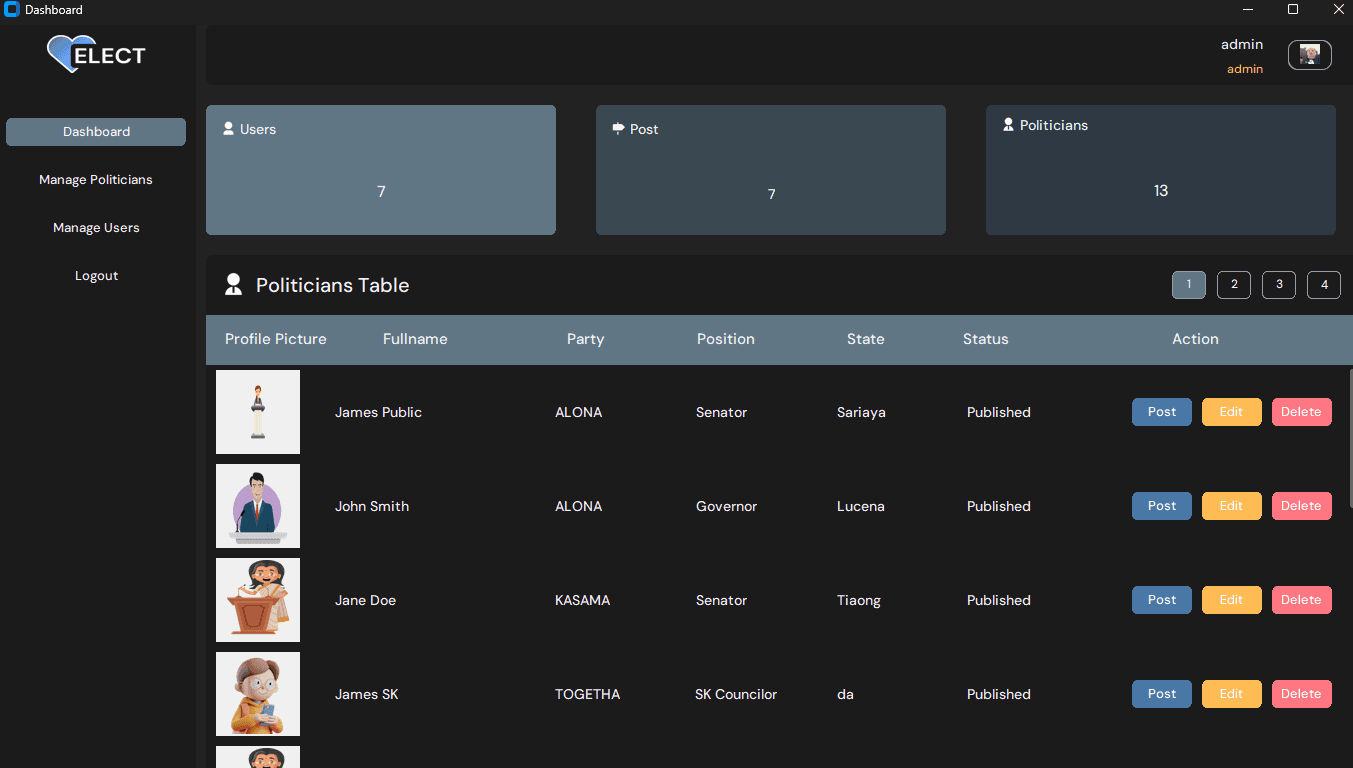
Admins can add, update, delete, and publish politician records, manage user accounts, and monitor real-time counts of politicians and users.
Challenges & Learnings
Challenge
Designing a system that clearly separates admin privileges from regular user access without overcomplicating the codebase.
Learning
Defined role-based access at the database and UI layer early — admins manage and publish records, users only view and interact. This boundary kept both sides of the app focused.
Challenge
The like system required tracking relationships between users and politicians without duplicating records or allowing inconsistent states.
Learning
Used a dedicated user_hearts junction table linking user IDs to politician IDs, making it straightforward to add, remove, and query likes without touching the core records.
Challenge
Building a desktop GUI with Python that felt polished and usable, not just functional.
Learning
CustomTkinter's modern widget set made it possible to ship a clean interface within the project timeline — picking the right library upfront saved significant styling time.
Results & Outcome
Deployment
Completed — Local
Users
Academic Project