 Meloniche×
- +

Meloniche
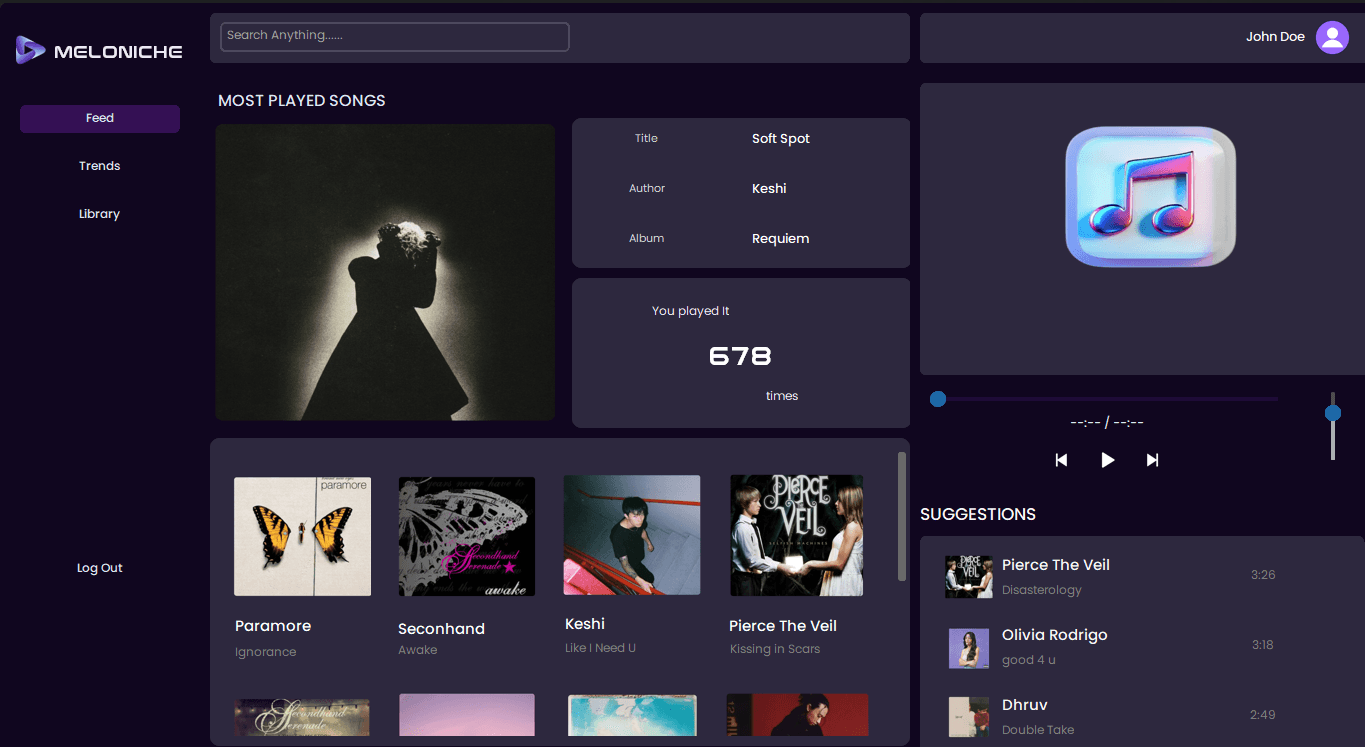
Meloniche is a desktop music player application built with Python and CustomTkinter. It lets users play local audio files, browse playlists, and explore music organized by category all from a clean, self-contained desktop UI.
Built as a personal learning project, Meloniche was a hands-on exercise in Python GUI development, exploring how to manage application state, handle file I/O for audio playback, and design a usable interface using a modern Tkinter wrapper.
Overview
Type
Group Project
Status
Completed - Local
Users
Personal learning project — completed and functional locally
The Problem
What problem?
There was no hands-on project connecting Python fundamentals to real GUI development. Most Python learning stays in the terminal, Meloniche was built to bridge that gap by applying core concepts to something tangible and usable.
Why build it?
The goal was to get comfortable building desktop interfaces in Python — understanding layout management, event-driven programming, and how UI frameworks handle state. A music player was the right scope: familiar enough to reason about, complex enough to be a real challenge.
The Solution
What was built?
Meloniche is a local music player with playlist browsing and category-based music grouping. Users can select tracks, navigate playlists, and organize audio by category through a CustomTkinter-powered interface.
How it works
Built entirely in Python using CustomTkinter for the UI layer and the Pygame mixer for audio playback. Playlists and categories are structured in-memory, with file I/O handling local audio files from the user's system.
My Role
Group Project
- →Designed and built the full desktop UI using CustomTkinter
- →Implemented audio playback using Pygame's mixer module
- →Built playlist and category browsing logic
- →Managed application state for currently playing track, queue, and navigation
Process & Thinking
How I approached it
Started by mapping out the core user flow: open the app, pick a playlist or category, select a track, play it. Built each piece incrementally — first the playback engine, then the file browser, then the category/playlist views.
Why this approach?
CustomTkinter was chosen because it produces a native-looking desktop UI without requiring web tech. It made the project feel like a real application rather than a terminal script with a window.
Key Insight
💡 The biggest learning curve was understanding event-driven programming — how callbacks, widget state, and audio playback all run concurrently without blocking the UI thread. Getting that right changed how I think about application architecture.
Tech Stack
Key Decisions
·Chose CustomTkinter over standard Tkinter for its modern widget styling and easier theming support.
·Used Pygame's mixer module for audio playback — lightweight, well-documented, and easy to integrate with Python without external dependencies.
·Kept all data in-memory during the session rather than using a database, which kept the app simple and focused on the UI/playback problem.
Architecture
No diagram provided
Features
Music Playback
Play, pause, and navigate through local audio files using Pygame's mixer — with basic playback controls surfaced directly in the UI.
Playlist Browsing
Browse and switch between playlists, with the currently playing track highlighted and the queue state preserved between selections.
Category Grouping
Music is organized into categories so users can explore tracks by genre or mood rather than navigating a flat file list.
Challenges & Learnings
Challenge
Keeping the UI responsive while audio was playing — early versions caused the interface to freeze during track loading.
Learning
Learned to offload blocking operations and handle Pygame's mixer events properly so playback and the UI could run without stepping on each other.
Challenge
Managing application state across multiple views — the playlist browser, category view, and now-playing panel all needed to stay in sync.
Learning
Adopted a simple shared state pattern: a single source of truth for the current track and playlist, passed down to each view component rather than duplicated.
Challenge
CustomTkinter's layout system has quirks that differ from web-based CSS — getting the sidebar, content area, and controls to resize correctly took significant iteration.
Learning
Got much more comfortable with grid and pack geometry managers, and learned to plan layouts on paper first before writing widget code.
Results & Outcome
Deployment
Completed - Local
Users
Personal learning project — completed and functional locally